

The rechargeable batteries in products like the iPhone, MacBooks, iBooks, PowerBooks and iPods are categorized as “lithium-ion.” Li-ion batteries, as they’re often called, provide reliable power for everything from cell phones to laptops, supplying significantly more power than nickel-based cells. Basically, Li-ion are not your father’s Duracell.

The following tips will extend the life of any Li-ion battery whether it’s playing games, answering e-mails on your laptop, taking a call on your iPhone or watching a movie on your iPod.
Requirements:
- Any laptop computer (MacBook, iBook, PowerBook, etc.)
- Any iPod or iPhone
How Your Apple Devices Charge Themselves
The batteries found in laptops (iBooks, Powerbooks, MacBooks) and the iPhone/iPod charge in two stages:
- Stage 1: The first stage is a rapid charge that pummels the battery with constant amperage and steadily increasing voltage. When the battery charges to 70% – 80% capacity, stage two begins, steadily decreasing the current while holding the voltage steady until the battery is fully charged.
- Stage 2: Stage two is commonly referred to as the “trickle” or “topping-off” charge and normally takes tree times as long as stage one. One myth is that Lilon battery life will be maximized by frequently draining the battery to 0% and then charging back up to 100%. While grabbing a few minutes of charge time here and there will eventually cause inaccuracies in the battery’s reported battery-charge and remaining-life times.
For more battery charging tips, see these MethodShop articles:
- 16 Ways to Make Your iPhone Battery Last Longer
- How To Calibrate Your Apple Laptop Battery
- How To Extend The Life of Your MacBook’s Battery – Tutorial
- 5 Signs That Your MacBook Battery Is Dying
- How To Maximize iPod, iPhone and MacBook Battery Life – Tutorial
Nap Time?
If you’re putting your laptop or iPhone in storage for an extended period of time, i.e. more than a month or two, be sure the battery is only partially charged. Stored with a full charge, the battery will permanently lose approximately 20% of its capacity per year. Even precautionary measures can’t prevent Li-ion batteries from losing capacity over time – but their rate of deterioration can be minimized by storing the device at cool (not freezing) temperatures. For example, avoid the attic and favor the basement for storage. Just remember to place your device inside a sealed bag, like a Ziploc, otherwise humidity and moisture can damage your electronics while they are being stored for long periods of time.
Battery Replacements
Replacement batteries for laptops (or extras for those who need them) are available through Apple for about $130+. However, they do not sell batteries for many older models. Batteries for most models, both old and new can be purchased through a third party like Amazon (click here for a MacBook battery search link on Amazon).
When purchasing a new battery, the main think you are looking for should be age. It’s much better to buy a battery that was manufactured very recently as opposed to a “new” battery that could have sitting on a warehouse shelf the past 5 years. Do your research.
As far as replacement batteries for iPods, checkout our Rapid Repair.
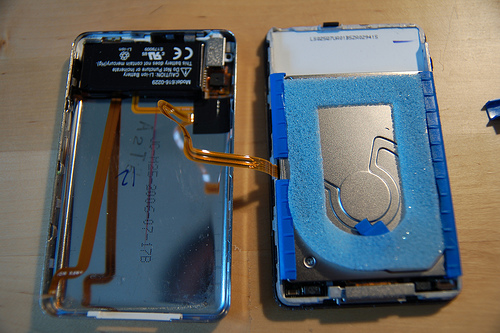
Crack Open Your Laptop

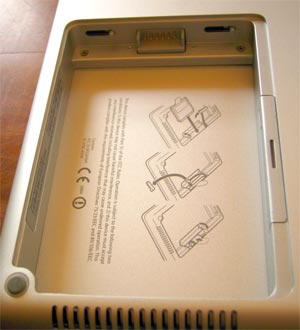
Have a new battery you want to stick in your Apple laptop? Depending on which model laptop you have, the exact battery removal procedure will differ slightly. Here’s how to properly open an Apple PowerBook G4. You should be able to adapt these instructions to your specific laptop.
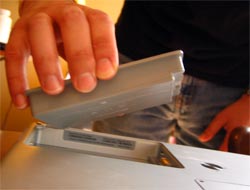
- Carefully remove the battery cover from the bottom of the laptop. Use a coin. Because of its thickness and smooth edge, a nickel coin works very well.
- Remove the old battery and replace the new one according to the diagram and directions within the battery compartment.
- Close her up and start charging to manufacturers’ advised instructions.
How To Check The Health Of Your Mac Laptop Battery Using Terminal
Lilon capacity is measured in milliamp-hours (mAh) – our 15-inch PowerBook G4 started out with 4,200mAh, so its claimed 4-hour battery life indicates a usage rate of approximately 1,000mAh per hour.
Determining the remaining battery capacity of your Macintosh laptop is easy. There are third-party applications to measure battery life but the quickest, easiest, and cheapest method is to use the Terminal (Applications > Utilities).
Open the Terminal. Type the following at the prompt and press Return.
ioreg -l | grep Capacity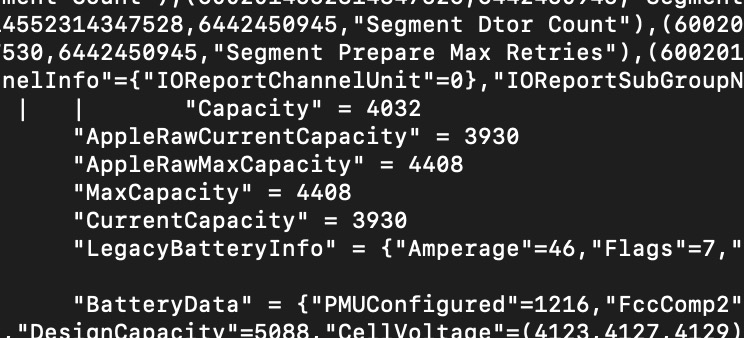
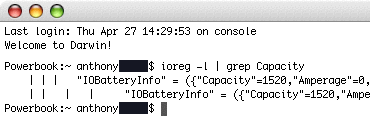
You’ll probably need to stretch the window to see the data. Depending on the age of your laptop and your Mac operating system, the labels may be slightly different. But the main thing is to compare the Capacity to the original Max Capacity. The difference between those two numbers is how much life has been lost from your original battery capacity.
- Capacity: indicates the current capacity in milliamp-hours.
- AbsoluteMaxCapacity: your battery’s original capacity
By the way, while writing this article I discovered that I need a new battery.
How To Maximize Battery Life on Your Laptops, iPhones and iPods #batteryreplacement #applebattery #liionbattery #batteryhealth #batterylife Share on X
Frank Wilson is a retired teacher with over 30 years of combined experience in the education, small business technology, and real estate business. He now blogs as a hobby and spends most days tinkering with old computers. Wilson is passionate about tech, enjoys fishing, and loves drinking beer.


 This Sexy Eva Longoria Maxim Cover Can Be Seen From Space (2006)


Leave a Reply
You must be logged in to post a comment.