

Is your iPod acting funny? There are a number of things that can be wrong with it, but this erase iPod super fix solution will cure most problems. In this tutorial, we are going to show you how to totally ERASE iPod and then re-install the iPod’s software from scratch. If your iPod has a software problem, this will probably fix it. If the hard drive is damaged, then that’s another story.
In order for this fix to work, your battery must be functioning normally. See our battery support questions for more information on those issues.
WARNING: YOU WILL LOSE ALL MUSIC, CONTACTS, AND EVENTS ON YOUR iPOD. IF POSSIBLE, YOU SHOULD BACKUP THESE FILES.
Erase iPod
To erase your iPod, just do the following:
ERASE iPOD (MAC OSX)
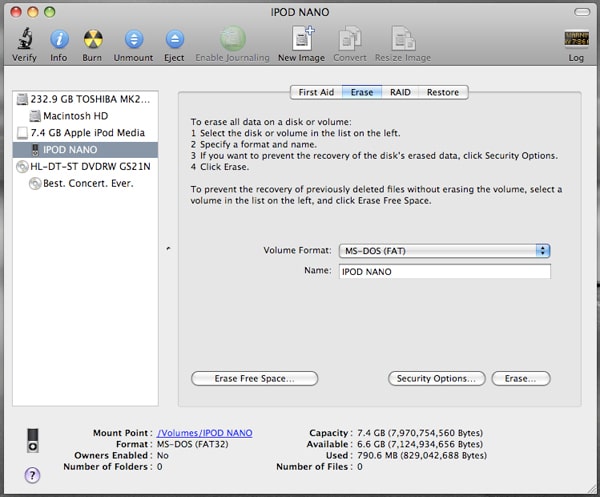
- If you have OSX, you can use Disk Utility (Macintosh HD > Applications > Utilities). If you have a PC running Microsoft Windows, then read the next paragraph.
- Select your iPod in the Disk Utility window and press the Repair button
- Then press the Erase button to erase iPod’s hard drive and select Extended Journaled as the format type.
ERASE iPOD (WINDOWS XP)
- Open “My Computer” on your Desktop
- Select “IPOD”. It should be listed next to your C drive.
- Right-click and choose “Format”
- Select “FAT 32” and <Format>
- Reboot Computer
ERASE YOUR iPOD (WINDOWS VISTA)
If these Vista instructions are wrong, please let us know. Vista was such a piece of crap we banned it from the office.
- Open “My Computer” on your Desktop
- Right-click on iPod
- Click “Format”
- Select “Restore Device Defaults”
- Press “Start”
How To Restore Your iPod
After you erase your iPod, you’ll need to run the Restore function before your iPod will work properly. To Restore your iPod, do the following:
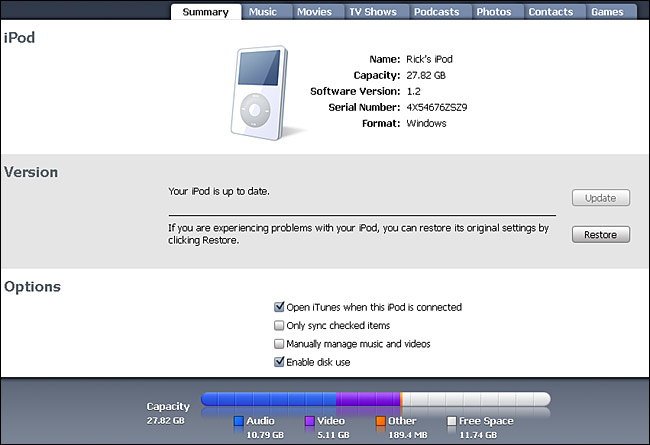
- Connect the iPod to your computer using the FireWire/USB cable that came with it.
- Open iTunes. Make sure you are using the newest version of iTunes. You can download
iTunes updates from tunes.com - iTunes may sense that the iPod is connected and prompt you to install any necessary software. If not, select your iPod from the Source column on the left side of your iTunes window. There will be several tabs along the top of the screen such as Summary, Music, Photo, and Contacts among others. You should select the Summary tab.
- Click Restore.

- You may need to type in an Admin user’s name and password. An alert box will ask you to confirm the restoration process. Say yes.
- When the factory settings have been restored, unplug the FireWire/USB cable from iPod.
- When prompted by the iPod, re-connect the FireWire/USB cable. After the iPod has updated itself and restarted, you should see the message “Do not disconnect” flashing on the screen.
- You may be prompted by iTunes to type in a name for your iPod. Feel free to get creative.
- The “Automatically update my iPod” option is selected by default. Deselect this option if you wish and click Done. The iTunes main window appears, and the download status is displayed in the iTunes display.
- Wait until the iTunes display says the update is complete.
- Quit iTunes.
- Disconnect the FireWire/USB cable from iPod. After a few moments, the Language display appears on the iPod screen.
- Select a language. If you screw up this step click here. One time I accidentally selected Chinese for the language. That sucked.
That’s It! Erase iPod Tutorial Complete
You should have now erased your iPod and then restored it. If you’re having problems, then keep reading.
Troubleshooting
If the iPod does not turn on at all, disconnect it from power and let it sit unconnected for approximately 24 hours. Then repeat this procedure.
If your iPod is still unresponsive, throw it away. Just kidding. If it is still under warranty, go to the AppleCare iPod Support Page to arrange for service.
If your iPod is out of warranty, then use our VIP Repair Service to get it fixed.
Congratulations, you did everything right when trying to troubleshoot this problem. One last thing, try hooking your iPod up to another computer. If you see the same problem, then you know the issue is definitely with your iPod and not your computer. If you are able to get a stable connection with a computer, then erase your iPod. Otherwise, it looks like you have a bad hard drive. It might have gotten dropped. Since this iPod is only 3 months old, it is still under warranty and you should have Apple repair it.
How To Erase Your iPod -- The Super Fix for Most iPod Problems Share on XRelated Articles:
- How To Save Your iPod or iPhone from a Toilet
- How to Fix iPod Auto Sync So It Doesn’t Erase Your Music
- Fixed! What To Do If Your iPod Battery Won’t Charge
- The Evolution of the iPhone: 2007-2011

Frank Wilson is a retired teacher with over 30 years of combined experience in the education, small business technology, and real estate business. He now blogs as a hobby and spends most days tinkering with old computers. Wilson is passionate about tech, enjoys fishing, and loves drinking beer.















 Fixed! What To Do If Your iPod Battery Won’t Charge


The iPod erase super fix worked BRILLIANTLY!! A recent software update fritzed my husband’s Classic 30 GB and it was stuck in eternal recovery mode. I tried everything Apple suggested and everything anyone suggested in the message boards. I even tried repairing the disk via the disk utility, but nothing worked. I finally googled “disk utility erase iPOD” just to see what it would do if I hit erase and came up with your page. It was quick and easy and the iPod is working perfectly! My only suggestion is to put more keywords on the page so other people having this problem who don’t know about disk utility can find it more easily.
Hi – this is a question about that folder with the exclamation mark. In short – 3 month-old, 40g iPhoto: about two weeks ago it froze, and just had a charging battery sign on it. I reset it, and it just showed the Apple logo, and then after several more attempts at resetting it or trying to put it into diagnostic mode (it wouldn’t go), it showed the folder with the exclamation mark. If I plug it into my computer it doesn’t recognize the ipod at all – not in itunes, not as a disk, and if I go to the updater it just asks me to plug in an ipod in order to update it. Whilst all this is going on, it shows the ‘do not disconnect’ sign – but not the large red-colored stop sign I am used to on the iphoto: instead it has an earlier-black and white version that looks like something off a c.1990 Apple Mac. It never stops telling me not to disconnect, so in order to recharge the thing I have just had to unplug it. NB I have installed new versions of iTunes (still doesn’t recognize it at all). Any ideas?
I would like to thank you and give you mad props for this page: Erase Your iPod. It showed me how to fix my video ipod (5th Gen) by formatting it. The error 1418 help on apple tech support and other websites just wasted more than 4 hours of my time. Your method worked right away. Your site did not immediately come up based on my search criteria or wording. In short you can also advertise this fix for the error 1418 and ipod’s with missing files and would not sync. I truly want to say thanks from the bottom of my heart.
YOU ARE A GOD-SEND! THANK YOU!
solved my problem!
I’m getting an error message saying “cannot allocate memory”…….
how long does the erase iPod in mac take? I’ve been running it for 16 hours and the partitioning estimated time increased from 1 to 8 hours!!
When erasing my iPod Classic (160G, 2009) in disk mode through Mac disk Utility (10.10.2) I get an error saying the disk can’t be unmounted. Tried all the usual fixes which is why I ended up here. Any thoughts?
depends on how messed up your hard drive is. could easily take overnight.
OS?
just restart your computer.
The ipod isn’t even showing up next to my c drive. What do I do?
Windows can’t reformat – “Windows (XP SP3) was unable to complete the format.” (exFAT only option)
iTunes can’t restore – “The iPod could not be restored. (error 1439)”
iTunes does not recognize drive size, but in the format prompt the disk size is correct (148 GB)
I have deleted the Apple Mobile Device USB driver and resinstalled, and I have restored the .dll files in case of corruption. I am at a loss.
How do you restore ipod classic 160gb after you have erased all memory. The ipod just comes up as untitled on my desktop. I am using mac OX yosemite
error saying cannot unmount disk drive help
Woohoo, this fixed my Ipod Classic 160GB.
Ensure iTunes is closed
In Windows 10, open Windows Explorer
Find your Ipod
Right click and select Format
select exFat and ensure Quick Format is ticked.
Format the Ipod
Open iTunes
It said it needed to restore so clicked OK
Once it was restored, I was able to add music
Thanks for the advise. I thought I had completely lost my iPod